Miru Desktop: Local-first Timer for Mac, Linux, and Windows
Miru Time Tracking is available as a local-first desktop timer with menu bar controls, timer stack, idle recovery, time entries, and Miru web sync.
 Vipul A M · · 3 min read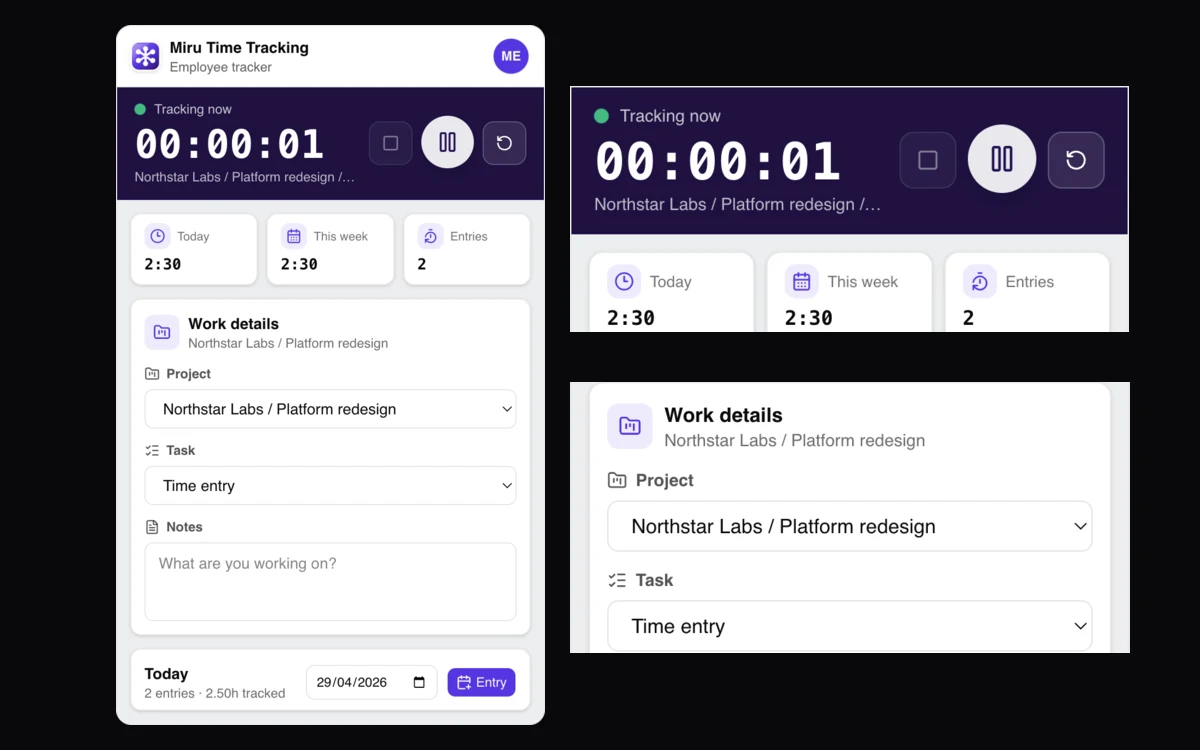
Capture first. No browser tab. Web is for review and billing; desktop is for reliable capture.
Desktop covers capture. Web handles approvals, invoices, expenses, payments, reports, and team workflows.
A timer shouldn’t need tab archaeology.
Why desktop
Time tracking fails quietly.
Missed starts and forgotten lunches break invoices. Desktop fixes the capture problem.
The desktop app is built for that boring reality.
What ships
Miru Time Tracking ships as a desktop app, with macOS as the first-class target and ZIP builds for Apple Silicon, Intel Macs, Linux, and Windows.
Ship checklist:
- menu bar timer: start, pause, reset, resume, stop-and-save
- timer stack: start a new timer without discarding the previous one
- local persistence across restarts
- entries: create, edit, delete, resume
- detailed entry drill-down for today, this week, and history
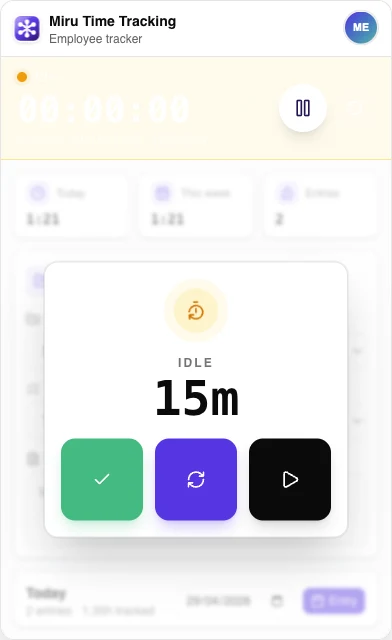
- idle recovery: trim and continue, trim and start new, or keep
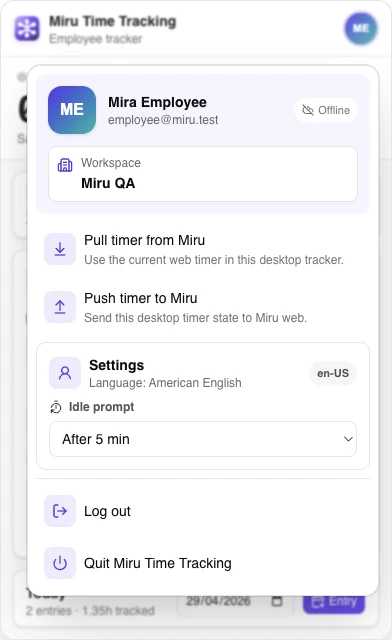
- workspace, account, and sync status in the app menu
- sync bridge to Miru web, including active and paused desktop timers
The goal is not to recreate the full web app in a desktop shell. That is just a worse browser.
Make capture trivial. Send everything to the web for billing.
Local-first, then sync
Desktop timers need to survive normal work.
Sleep the laptop. Relaunch the app. Lose the network. Switch back from a meeting.
The app keeps timer state locally and continues to track. When Miru web is reachable, it can pull or push the current timer through the API.
Right split:
- desktop for capture
- web for review and billing
- CLI for terminal workflows
- API and MCP for automation
Same product. Better surfaces.
Built in public
Repo: saeloun/miru-time-desktop.
Stack: Electron Forge for the macOS app and menu bar, Vite + React + TypeScript for fast builds and shared UI with Miru web. No native-only UI stack unless we need one.
Tests: Vitest unit tests plus Electron Playwright integration specs for timer sync, local entries, resume, idle recovery, persistence, multiple timers, and compact timer layout.
Release checklist: run tests, build the desktop artifacts, smoke open the packaged app, verify the Miru icon and menu bar timer, then publish.
No runtime surprises. No extra native UI stack. Strict verification before publish.
Download
- Download for macOS Apple Silicon
- Download for macOS Intel
- Download for Linux x64
- Download for Windows x64
- Read the release notes
macOS downloads are Developer ID signed, notarized, and verified after download. Use Apple Silicon for Apple M-series Macs.
What the latest build tightened
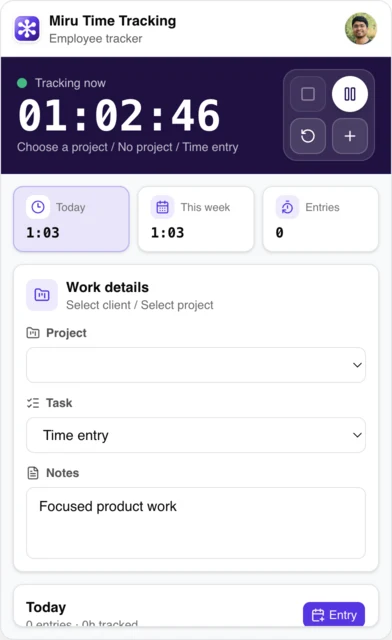
The latest desktop build focuses on the part you stare at all day: the timer. The compact window keeps the running state calmer, improves idle recovery, adds a default avatar fallback, and ships signed and notarized macOS ZIPs.
The release also ships a Playwright layout regression spec. It opens the packaged Electron app, checks the timer display, checks the control dock, and fails if the two overlap. The screenshots in this post come from the same packaged desktop surfaces we verify locally.
The profile preview uses a real connected-account avatar with generic local timer data. It does not include email, tokens, production workspace, client, project, or time-entry details.
What to try next
Use Miru on the web today. Install the desktop app when you want the timer to stay close.
- Start Miru: app.miru.so/signup
- Read the desktop feature page: miru.so/features/desktop-app
- Follow the source: github.com/saeloun/miru-time-desktop
PRs welcome.
Vipul A M
Co-founder at Saeloun. Building Miru. Rails contributor. Shipping from Pune, India.
Read next
The Floating Timer: Track Time Without Leaving Your Current View
New in Miru: a floating timer that lives on every page. Start, pause, stop, and save without navigating away from what you're doing.
Copy Last Week's Timesheet: The Feature That Saves 10 Minutes Every Monday
If your week looks like last week, why re-enter everything? New in Miru: one-click week copy and quick entry shortcuts.
Pricing update: $1 per member, from the first member
Miru's cloud pricing is changing. No more free tier — every member is $1/month from day one. Self-hosting stays free. Here's the reasoning.
Put it to work
Run one cleaner billing cycle in Miru.
If this article is about tracking time, billing clients, comparing tools, or automating work, Miru is the product version of that idea. Start for $1/member, invite the team, and send the next invoice from tracked work.
What you get
- Time tracking, invoices, expenses, and payments in one place.
- $1 per member per month. Free if you self-host.
- Open source, with CLI, API, MCP, and self-hosting paths.
The article is the argument. Miru is the workflow.
Track the work, approve the hours, send the invoice, and get paid without bolting together three separate tools.